
NoteTell is just a copy of Cash Reader
Last updated:
This is our statement about the NoteTell copycat app.
My name is Tomas Jelinek. In 2018, a colleague and I created Cash Reader, one of the first apps to use neural networks on a phone for fast offline banknote recognition. We’ve put thousands of hours of work into Cash Reader, and today it’s one of the most trusted apps, used by blind people all over the world.
We recently learned about a new competing app, NoteTell. We welcome competition, and we regularly work with many other app makers, even though our businesses often overlap. Unfortunately, NoteTell isn’t competition. It’s a blatant AI copy. Its author simply got an AI to copy Cash Reader, screen by screen. Here and there, the AI changed a color or reworded some text.
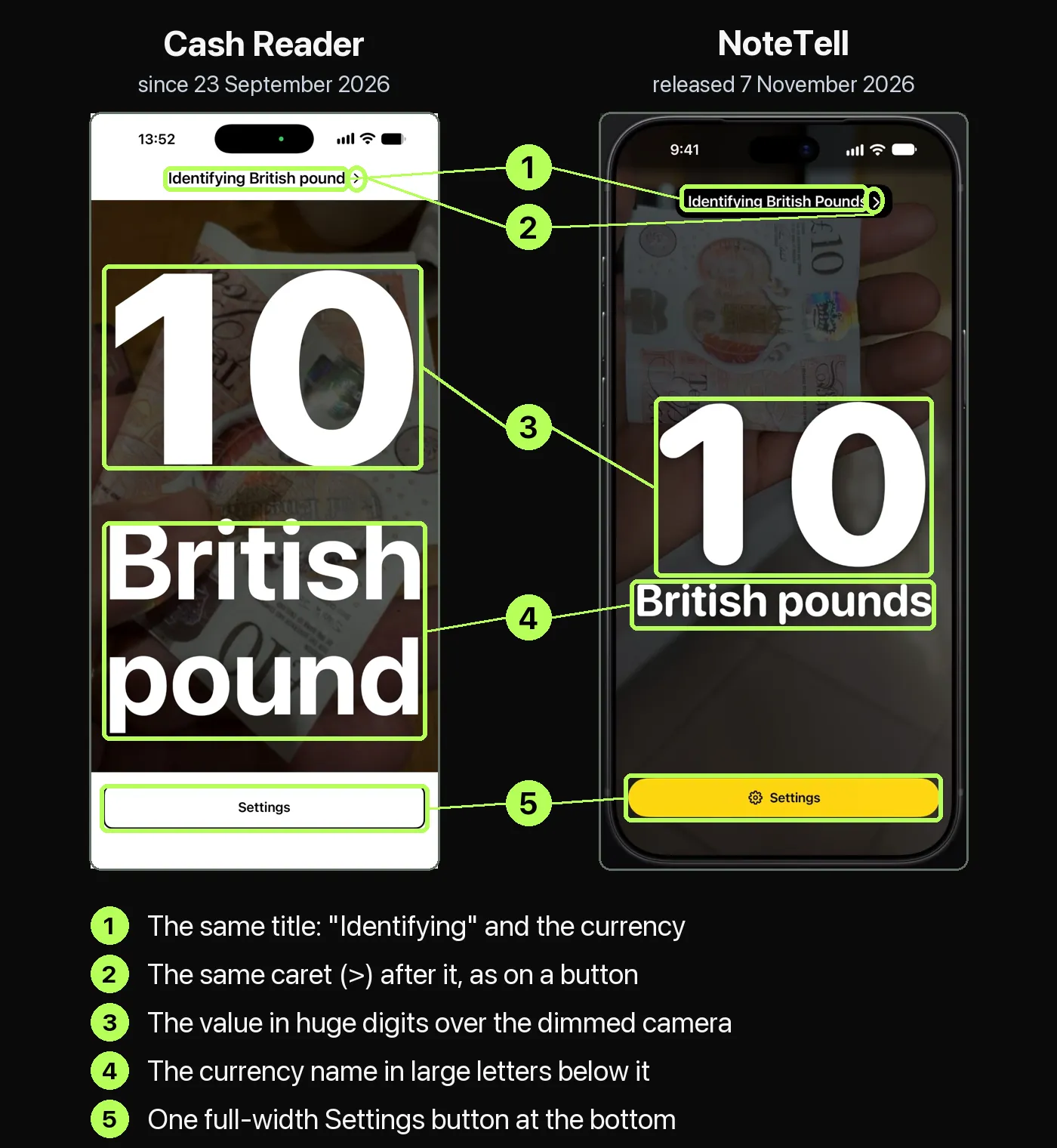
We’ve always faced piracy, but AI clones are worse, because they’re distributed through official channels and it’s hard to prove that they’re clones. With NoteTell, it wasn’t hard. Below you’ll find our comparison, which shows that the author copied even small details, such as the small caret at the end of the title button on the main screen.
We knew this would happen. But what makes us unique is the training of our recognition models, which we’ve been improving for years, on a huge number of photos of real banknotes.
But the saddest part of the story lies elsewhere. As we soon found out, this clone was made by our longtime colleague Moses Gitari from Kenya. Early on, Moses contacted us because he wanted to translate Cash Reader into Swahili, and after that we worked together for years. So he was in a small group of ambassadors who had access to all of our company’s know-how.
He was always paid for his work, even at times when we had almost no income. Later, because he was our friend, we even paid for his university studies, so that he could make his way in Kenya, find a good job and have a better life.
That’s why this was completely shocking and incomprehensible to us. He copied the whole app and, without our knowledge, released it on the App Store at half the price.
Despite the know-how he gained with us, his recognition model comes nowhere near the quality of Cash Reader. But in the end, the price may win users over, and all the other features, which we spent years refining with the community, he simply copied, shamelessly.
Because of this, we have of course ended all cooperation with Moses, and we’ve reported NoteTell to Apple for breaking App Review Guideline 4.1, Copycats. Before we manage to get the app removed from the App Store, many people may buy it. It will keep working for them after that, but it won’t get any more updates, so people who paid for it as a lifetime purchase will lose out, and they’ll surely be disappointed. That’s why we also want to use this page to warn people about the unfair practices of Moses Gitari and his company.
Below you’ll find screenshots comparing Cash Reader with NoteTell, and evidence that connects this app to our former ambassador.
In his defense, Moses claims that the whole app is his “own independent work”, but we believe the comparisons below disprove that.
Tomas Jelinek, founder of Cash Reader
The rest of this page is a catalogue of evidence and comparisons. Parts of it were prepared with the help of AI, but always from real screenshots of the NoteTell app or from information available on the web.
1. The two apps side by side
Here are the two apps next to each other. Every picture has a full text description, so a screen reader can tell you what's in it.
The same main screen
This is the main screen of each app while it reads a 10 pound note. We've numbered five details that are the same in both.
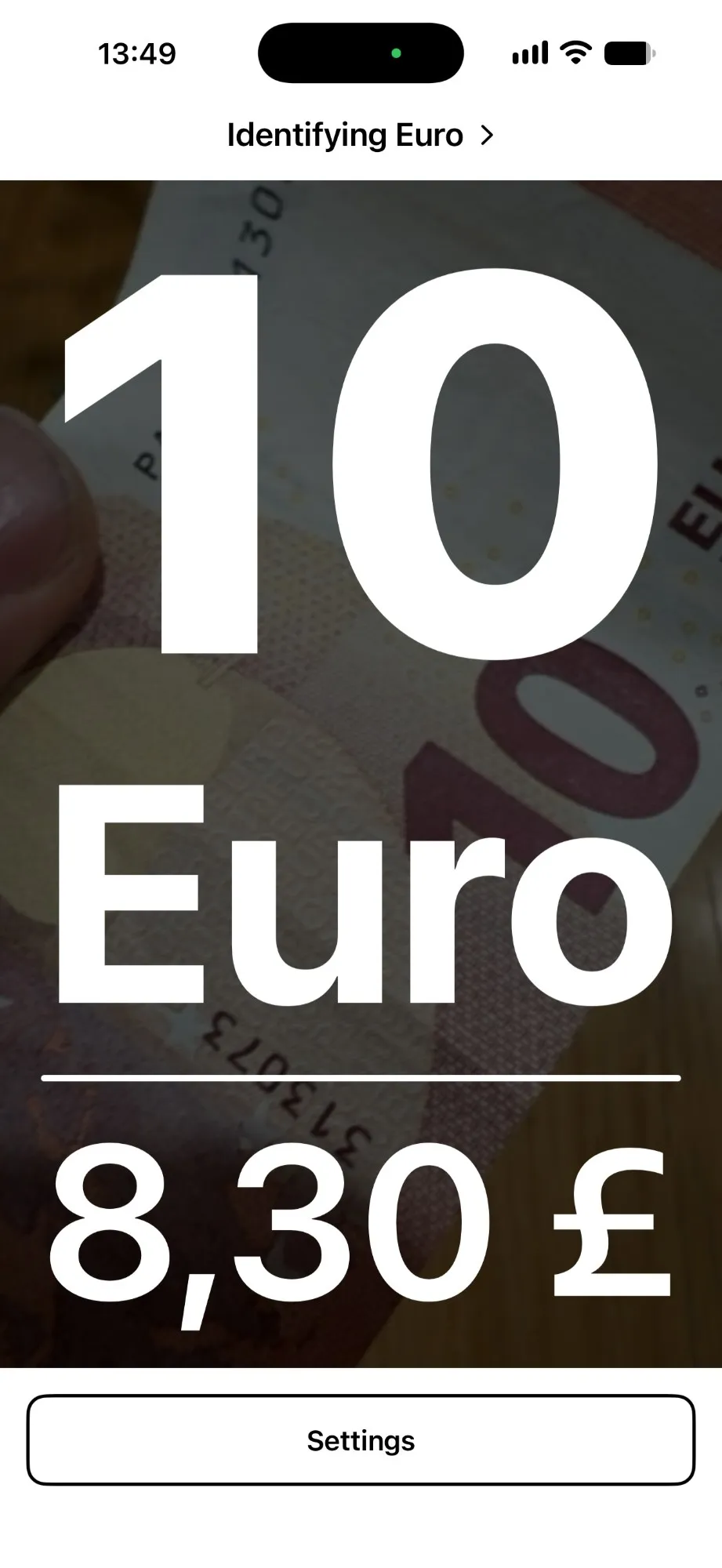
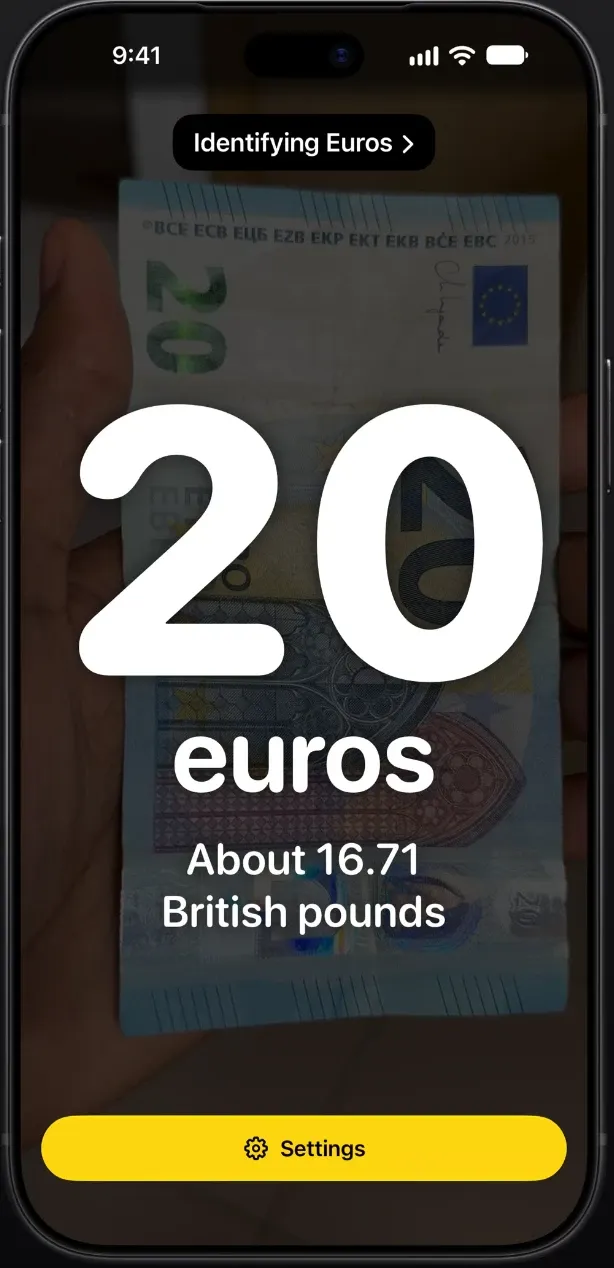
With currency conversion
The same vibration code, played in pairs
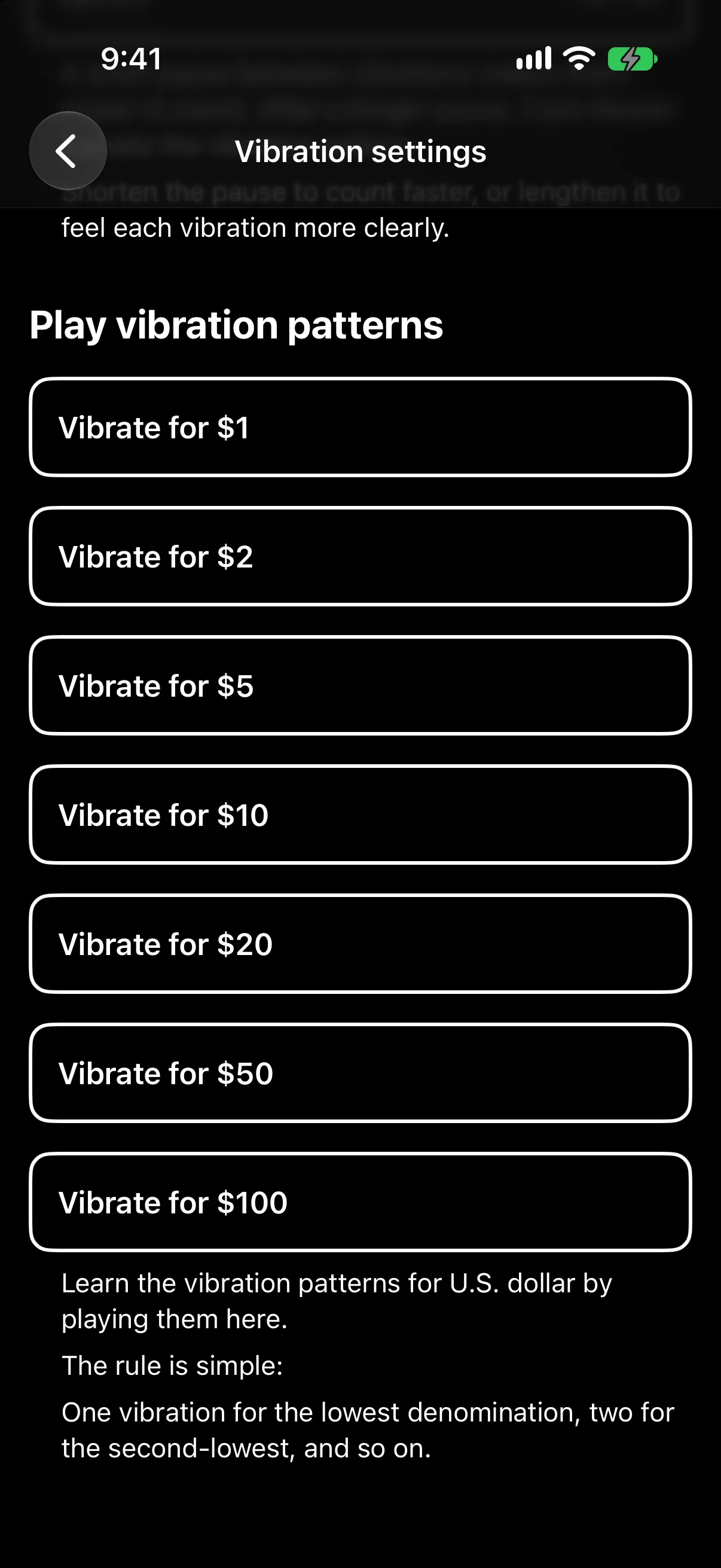
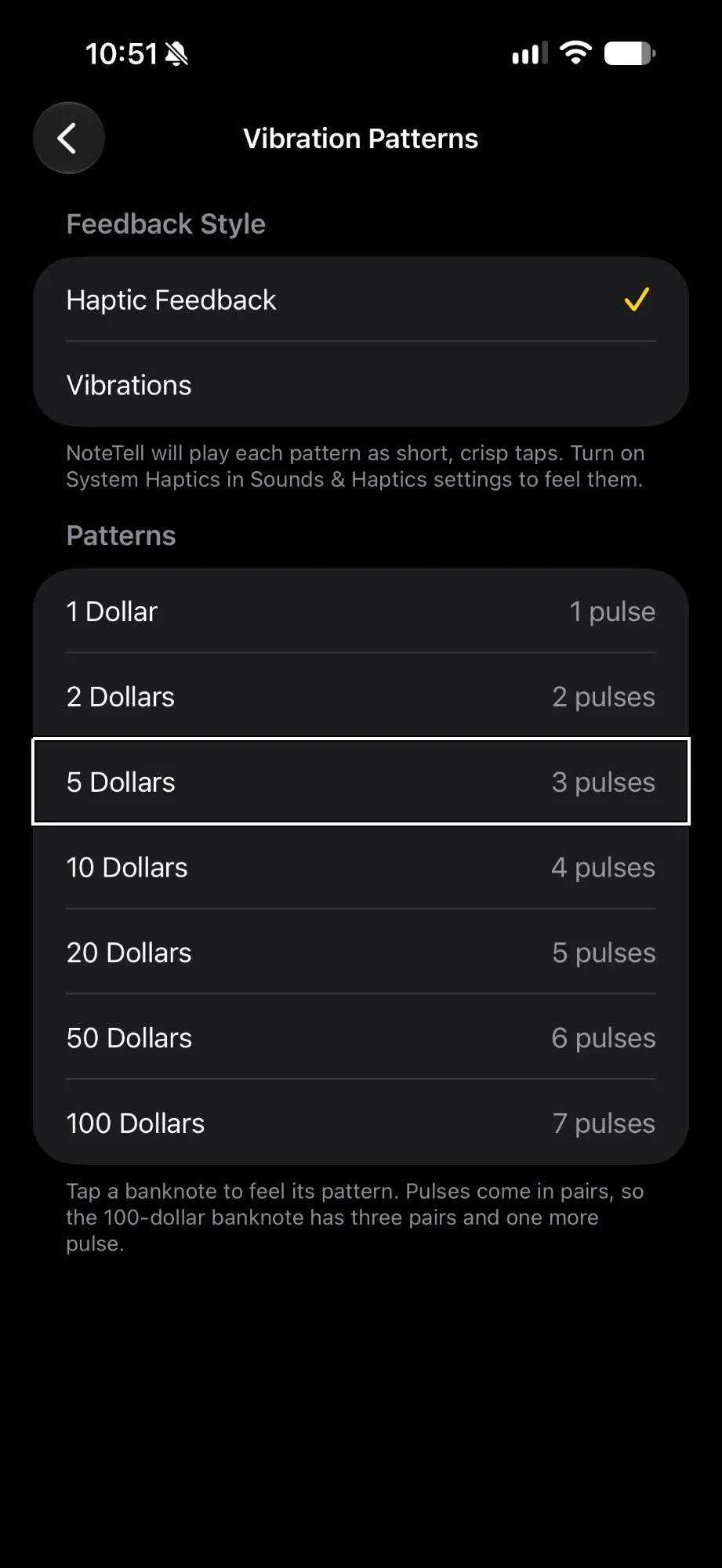
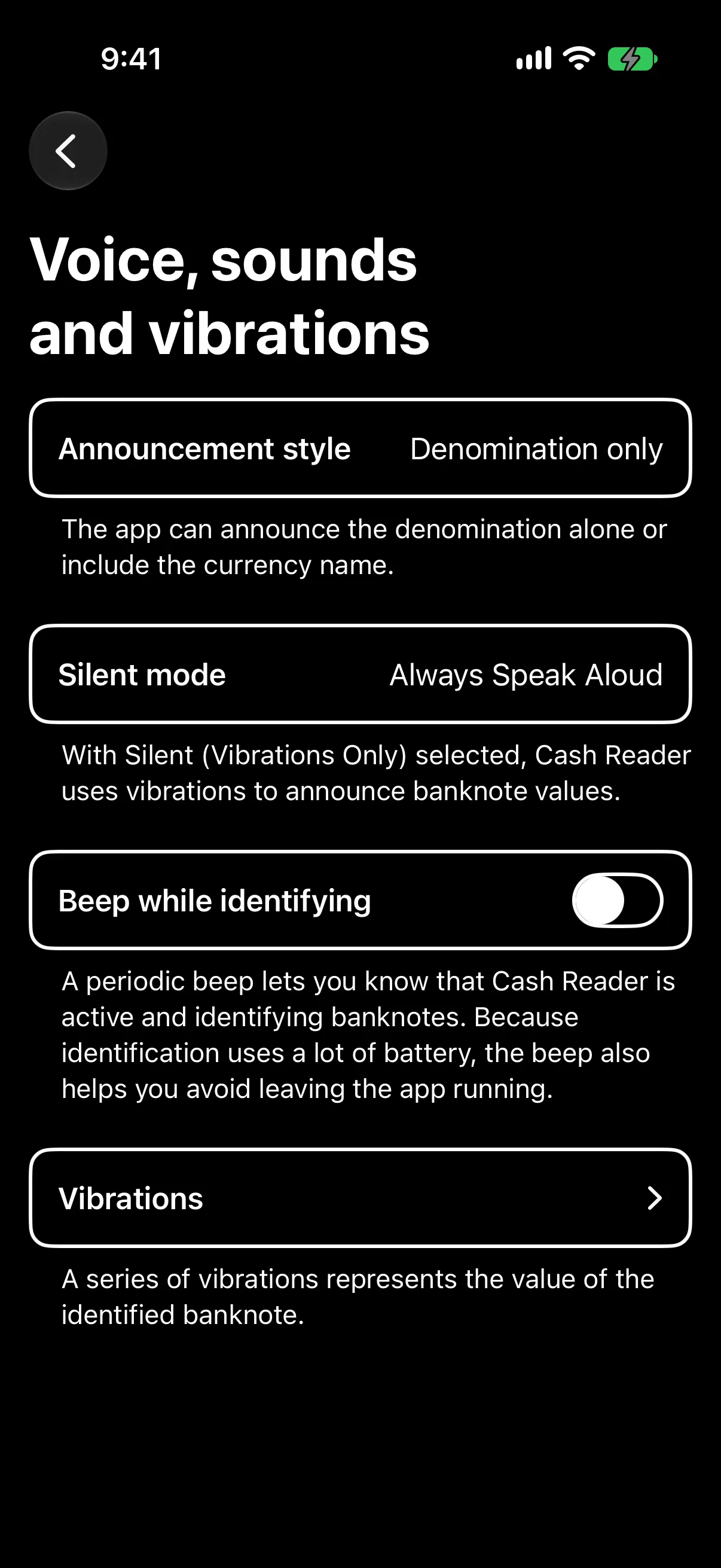
Since 2018 Cash Reader has used this vibration code: the lowest note gets one pulse and each higher note gets one more, so $100 gets seven. It has played the pulses in pairs since at least 2019, and we never wrote that down anywhere. NoteTell's screen lists the same code and also says the pulses come in pairs.
A sound every 10 seconds while searching
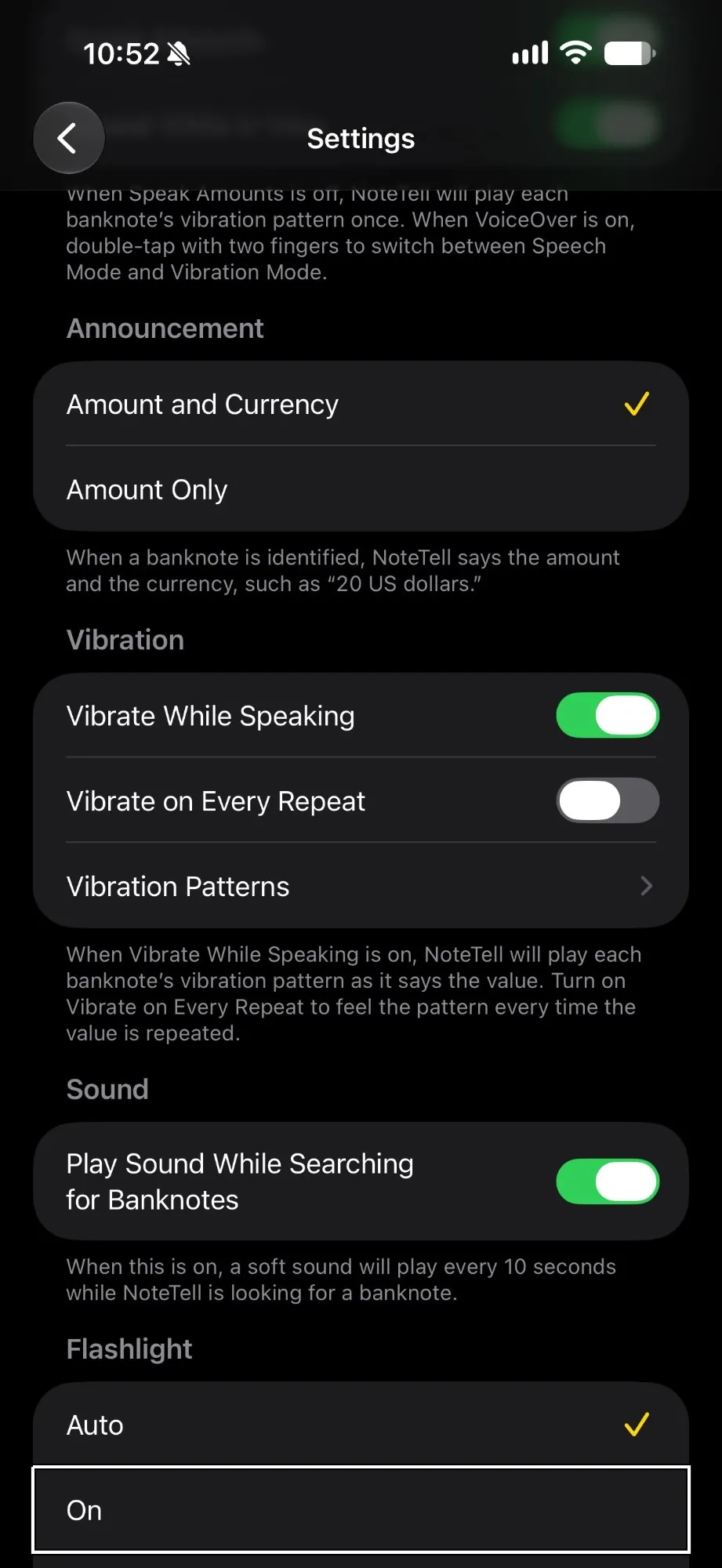
Since January 2025 Cash Reader has beeped every 10 seconds while it identifies banknotes, and we don't mention that interval in any of our texts. NoteTell's settings say a soft sound plays every 10 seconds while it looks for a banknote.
The same free notes, $1, $2 and $5
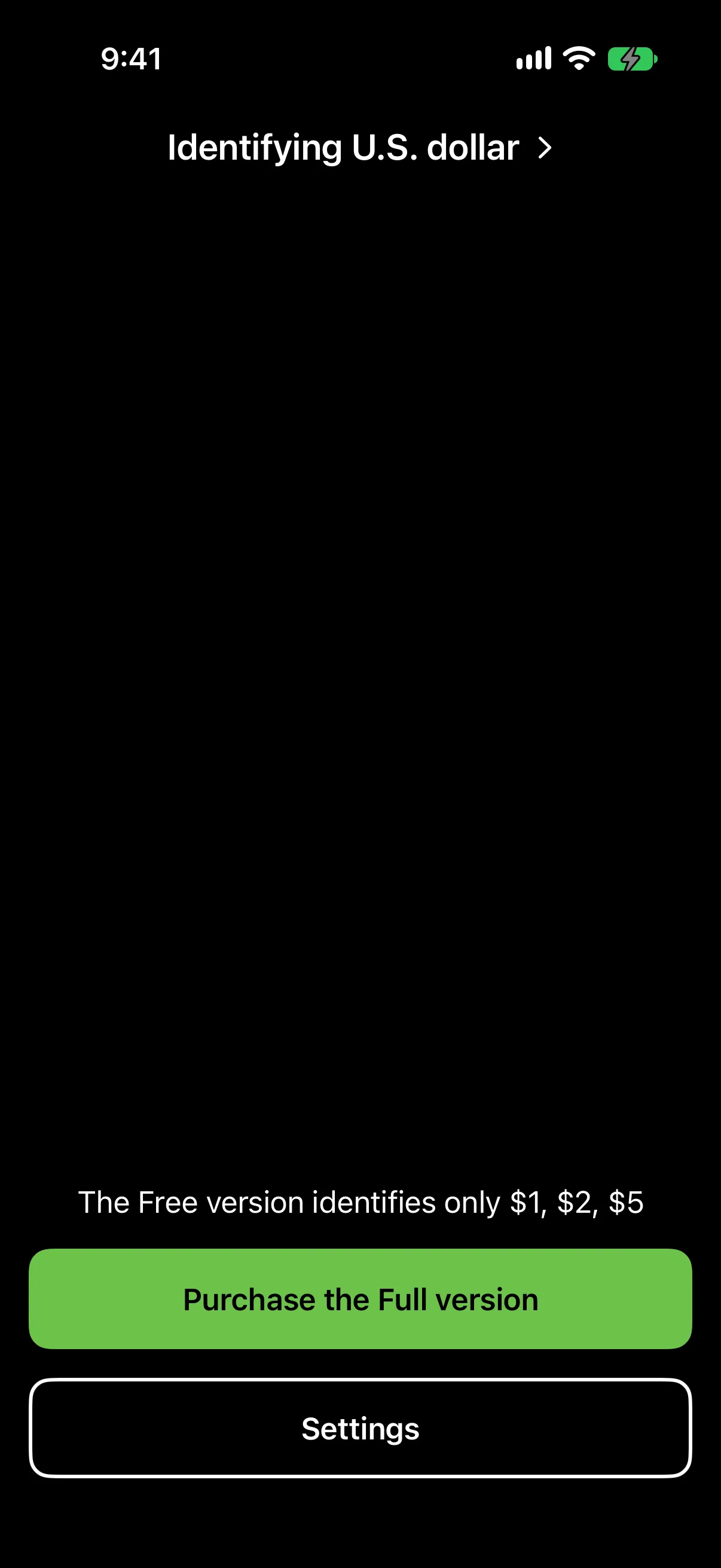
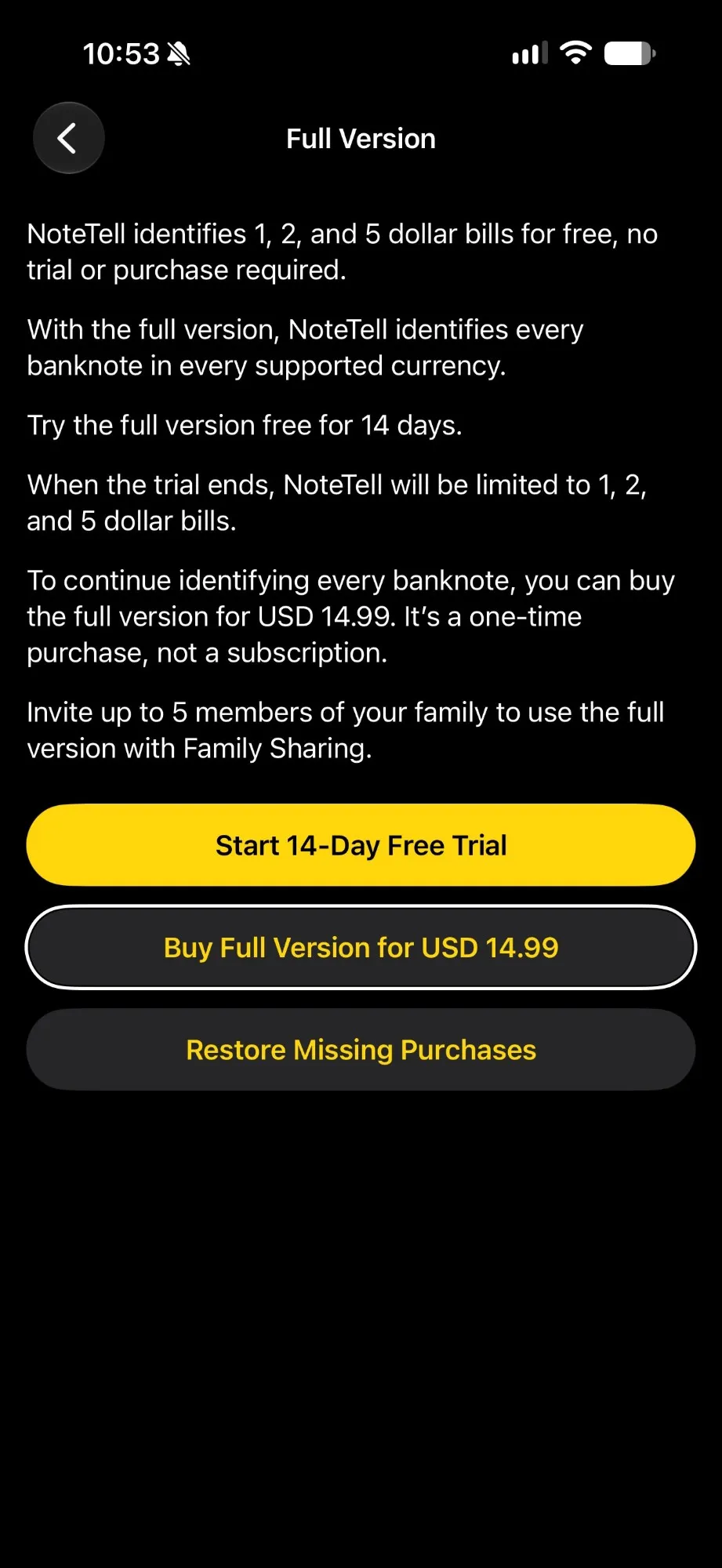
Since 2018 Cash Reader has identified $1, $2 and $5 bills for free and offered a 14-day free trial. NoteTell says it does both. In the US App Store in November 2026, our lifetime license cost $39.99 and NoteTell's full version cost $14.99.
2. Who is behind NoteTell
You don't have to take our word for who is behind NoteTell. Public pages connect the app and its seller, GeeksModo Limited, to Moses Gitari.
NoteTell's seller is GeeksModo Limited
NoteTell's App Store page lists GeeksModo Limited as the seller. It's the only app that seller has in the US and UK App Stores. Version 1.0 came out in November 2026.
Sources:
- Web Archive copy of NoteTell's US App Store page, 17 November 2026
- Web Archive copy of Apple's public app data for NoteTell (seller name and release date), 17 November 2026
- Web Archive copy of Apple's list of the seller's apps in the US App Store, 17 November 2026
- Web Archive copy of Apple's list of the seller's apps in the UK App Store, 17 November 2026
A Paths to Literacy profile calls Moses Gitari the founder of NoteTell
Paths to Literacy, a website of Perkins School for the Blind, has a profile of Moses Gitari. It calls him the founder of NoteTell Money Reader and says he runs the tech blog GeeksModo.
The "Email Moses" button on that profile opens [email protected]. That's the Cash Reader address we set up for him in February 2019.
GeeksModo names Moses Gitari as its Editorial Director
GeeksModo's About page calls Moses Gitari its Editorial Director and says he runs GeeksModo and gives it business direction. The footer of the site names GeeksModo Limited as the copyright holder.
3. Moses Gitari worked with Cash Reader
Our About page listed him as an ambassador
Our About page lists Moses Gitari from Kenya among our global ambassadors, and has since at least January 2026. Ambassadors help with translations, collect banknotes and spread the word. He was still on the list when we published this page.
He had a Cash Reader email address
We set up [email protected] for him in February 2019. It's the contact address on his Paths to Literacy profile.
What he did for Cash Reader
Moses translated Cash Reader into Swahili in December 2018 and updated the translation in 2019 and 2020. Cash Reader has been available in Swahili since January 2019.
From 2019 he was our paid ambassador for Africa. He bought banknotes for us in several African countries and arranged for other notes to be filmed, so Cash Reader could learn to recognize them.
He was also one of our testers, from January 2019 until November 2026. Through Apple's TestFlight he could install new versions of Cash Reader before we released them.
We paid him every month from 2019 to 2023, and after that for smaller tasks.
All of this is our own statement. We have the emails, invoices and messages behind it, and we don't publish them because they contain personal details.
4. The details, with sources
This part is for readers who want to check everything themselves. We compare our own texts with NoteTell's App Store page and website, and every claim links to a dated copy in the Web Archive.
The same kind of free version
Since version 1.4 (2 July 2018), Cash Reader for iPhone has offered a 14-day trial of the full version with no payment. After it, the app returns to the free version, which still identifies the lowest notes of each currency (for most currencies the two lowest, for US dollars the $1, $2 and $5 bills). From April to October 2018 (versions 1.0 to 1.15), Cash Reader's App Store description named "1, 2, 5 US Dollars" as free.
NoteTell's website describes the same design. It says the 14-day trial is free, that there is no charge when it ends, and that afterwards US $1, $2 and $5 bills and the two lowest notes of every other currency stay free. Unlike Cash Reader, NoteTell sells no subscription.
Among about 40 banknote apps whose public descriptions we reviewed on 16 November 2026, only Cash Reader and NoteTell describe this combination.
Two details we never wrote down
Cash Reader's vibration pulses have come in pairs since at least 2019, and its optional sound has played every 10 seconds since version 1.69 in January 2025. But we never wrote either detail down anywhere.
NoteTell's App Store page and website say its vibration pulses also come in pairs, to make them easier to count. Its accessibility page says a soft sound also plays every 10 seconds while the app looks for a banknote.
Anyone who uses Cash Reader can notice them, and Moses used and tested it for years.
Our sentences, reworded
Many sentences that Cash Reader published earlier appear, reworded, on NoteTell's App Store page and website. Each pair below gives our text first, then NoteTell's, with where and since when each appeared.
Pair 1: Hearing the value in your home currency
“Hear each banknote's value in your home currency.”
Where: Cash Reader's App Store description
Web Archive copy of Cash Reader's US App Store page, 31 October 2026
“With the full version, you can use Currency Conversion to hear each banknote’s value in your home currency when you travel.”
Where: NoteTell's UK App Store page. Its US page says "bill" instead of "banknote".
NoteTell's sentence contains ours word for word.
Web Archive copy of NoteTell's UK App Store page, 17 November 2026
Pair 2: "Don't see your currency?"
“Don't see your currency? Tell us which one you need.”
Where: Heading and the line below it on cashreader.app/currencies
Web Archive copy of Cash Reader's currencies page, 13 January 2026
“Don’t see your currency? Let us know which one you need.”
Where: NoteTell's website
Pair 3: Control Center, the Lock Screen and the Action button
“Add Identify Money to Control Center or the Lock Screen, or assign it to the Action button.”
Where: Cash Reader's App Store description
Cash Reader 1.80 release notes, 23 September 2026: "Add Identify Money to Control Center or your Lock Screen, or assign it to the Action button on supported iPhones."
Web Archive copy of Cash Reader's US App Store page, 31 October 2026
“You can also add NoteTell to Control Center or the Lock Screen, assign it to the Action button, or set it up as a Vocal Shortcut.”
Where: NoteTell's US App Store page
Web Archive copy of NoteTell's US App Store page, 17 November 2026
Pair 4: Noisy places and deafblind people
“Feel the value discreetly through countable vibration patterns, useful in noisy places and for deafblind users.”
Where: Cash Reader's App Store description
Web Archive copy of Cash Reader's US App Store page, 31 October 2026
“Vibration Mode is also useful in noisy places and for people who are deafblind.”
Where: NoteTell's US App Store page
Web Archive copy of NoteTell's US App Store page, 17 November 2026
Pair 5: Hear, feel or see
“Point your camera at a banknote to hear, feel, or see its value.”
Where: Cash Reader's App Store description, first sentence
Cash Reader's onboarding has said "Point your camera at the bill and hear, see or feel its value." since 2018.
Web Archive copy of Cash Reader's US App Store page, 31 October 2026
“Simply point the iPhone camera at the bill you want to identify, then hear, feel, or see its value.”
Where: NoteTell's US App Store page, first paragraph
Web Archive copy of NoteTell's US App Store page, 17 November 2026
5. What we have done
We reported NoteTell to Apple
We reported NoteTell to Apple in November 2026, through its "Report an app" form. We filed it under App Review Guideline 4.1, Copycats, which is quoted below.
Apple's longer guidance for 4.1 adds that apps shouldn't imitate other apps' features and functionality or copy their look and feel.
What happens next is up to Apple, and Apple doesn't tell us the outcome. The only sign we'd see is NoteTell disappearing from the App Store.
“Come up with your own ideas. We know you have them, so make yours come to life. Don't simply copy the latest popular app on the App Store, or make some minor changes to another app's name or UI and pass it off as your own. In addition to risking an intellectual property infringement claim, it makes the App Store harder to navigate and just isn't fair to your fellow developers.”
We ended his access and asked him to remove NoteTell
We've ended Moses's access to Cash Reader's test builds and to his Cash Reader email account.
We've also asked him to remove NoteTell from the App Store. It was still there when we published this page.
Updates
- : Page published.
Questions or more evidence? Write to us through the contact form on our About page. Contact form on Cash Reader's About page